|
|
In Association with ...

_
 

___

___
|
Vintage Keyboards in your Home Recording Studio Set-Up If you're a bit bored, or simply can't afford, today's trendy but expensive toys, or if you want a break from virtual instruments, well look no further. I love virtual stuff too and it's getting more amazing with every release, but ya' can't beat the real thing they reckon - and it can be a cheap, practical and fun option.
As our title suggests Vintage Keyboards is our answer. Some of these golden-oldie original patches, are still being emulated digitally today, 20 or 30 years later, with varying degrees of success, but certainly they are now major players in music n' PC land, and getting stronger..
I like to use a studio combination of vintage AND virtual gear, and I think that some old 'boards have a certain magic about them, anyways...
This page is dedicated to me ol' pal n' muso Mr. Gerry H (with some funny letters behind his name ;-). G'wan the 80's Subzero! If ya' need someone to program emergency MIDI files on an aeroplane to a gig, he's yer man!
-
-
-
-
-
-
-
DW8000 64 Original Patches Info.
Vintage Keyboards in your Home Recording Studio Setup Many of these poor orphans of yesteryear (ahh), have absolutely tons of undiscovered potential inside them, just waiting to be released onto an unsuspecting world. With a bit of detective work, you can snap up some true bargains, get the sounds you want and more.
Some older keyboards can also be used with great effect as Mother Keyboards. We'll be looking at some in future articles.
Basically you need to know is what type of sounds you'd like in your set-up, and which oldies have these possibilities. Do you need Airy Pads or Brass or Swishy Filter Changes, which ones are great for programming, or maybe you need Preset Pianos, do Blistering Basslines and so on. It depends on what you use them for, Recording/Gigging/Sound FX and the like. These are the issues tackled right here.
Of course you can then further edit your new/old patches with PC Software, samplers, or run them thru' some select Digital FX, the sky's the limit.
And here, you can read the first in our series of articles, focusing on which machines are worth grabbing, and what they're capable of doing.
Yes, grab 'em while you still can. But be careful out there. Some vintage gear either costs an over-rated fortune (if it's on today's Trendy Retro List), or is as rare as an Irish astronaut. We'll be concentrating only on gear that sounds great, has a bargain price, and is reasonably available.
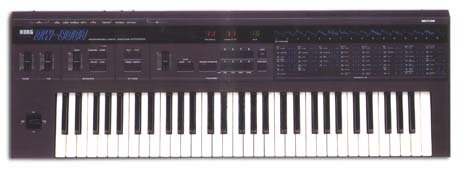
For example the Korg DW8000 featured now, in a minute, comin' up, has fantastic 80's sounds that we've probably all heard, but would seldom use today. But pushed and abused beyond it's original intentions, this loveable synth can still come up with some wonderful, original, and useable patches. Movie FX or Grooving Bass Lines for dance music, ethereal pads, heavenly arpeggios...Just like you might hear on good ol' MTV.
And the current asking price for this programming beauty?About €400!!!
When it comes to Vintage Keyboards, like a lot of things, there's the good, the bad and the downright Brilliant. We'll be focusing on the latter. With lots of demo's along the way, let's git going...
__________
Home Recording Setup
Studio n' - Vintage Keyboards Special
Korg DW8000
DW 8000 Atom Dance ©
I just realized that this little sample above is a bit left-sided Doh... I'll have to fix it whenever ;-). Anyway I hope it's enough to give you an idea of the DW Arpeggiator.
On the Synthesizer Evolutionary Ladder, this little classic arrived at a very crucial stage of development. It's the mid-80's, and as Analogue Synths gradually metamorphosed into the Digital Monsters we all know, luv and hate today, this baby arrives on the scene, and in hindsight seems a bit like the missing link.
Up 'til 1985, all synth sounds were based on traditional Analogue Oscillator Waveforms. We're talking here about the sound's start from scratch, it's basic building blocks. The DW was one of the first successful synths, to use Digital Samples as starting points, which can then be Analogue Edited. Nowadays it's called S+S (Sample +Synthesis) and it's everywhere. Why? 'Cos it sounds brill.
-
Home Recording Setup Studio Tips This hybrid also included FX parameters (512ms delay/chorus, storable with each sound), and this too was ground-breaking for it's day, and led the way.
-
Home Recording Setup Studio Tips Not to mention, Velocity + Aftertouch Sensitive Keys, Clockable Arpeggiator, White Noise, Auto Bend, and Midi, Stereo Output (wow), to name but a few of it's characteristics.
-
Home Recording Setup Studio Tips If your looking for realistic Piano's, Strings, Brass or other, more traditional sounds, I suggest something else. That's not where this machine's strengths lie.
-
Home Recording Setup Studio Tips It does have very powerful Swirly Organs tho', and in Unison mode, there's some great big fat Bass lines, that will literally shake the furniture!
-
Home Recording Setup Studio Tips Swishy, wobbly and filtery madness, is also no problem. And of course it's full of genuine 80's patches if you load the presets.
Home Recording Setup
Studio n' - Vintage Keyboards Special - Demo
I use the DW8000 as a type of giant FX Machine. As mentioned, run it through a few pedals and processors, or record it into a sampler and your away. I love the Arpeggiator. Here's a few idea's...
 Universal DW 8000 Missing Link Demo© Universal DW 8000 Missing Link Demo©
This oul' hybrid can sometimes be bought at very silly, low prices, if you keep your eye's and ear's open. Don't go for the earlier DW6000 model tho', it's not quite up to scratch.
With it's simple but effective, analogy control over parameter changes, this Korg is a nice contrast to modern-style, jumping from one digital window to another. Yes, the samples by today's standards are a bit grungy, but hey, there's plenty of characterless sounds out there today, who need's another one?
-
Home Recording Setup Studio Tips Upgrades and Expansion boards were released, and there's plenty of interest, patches and stuff like editors, available on the 'Net.
-
Home Recording Setup Studio Tips Inspiring, Useable, Cheap, and Fun.
***
Home Recording Setup
Studio n' - Vintage Keyboards Special
Tips
-
Home Recording Setup Studio Tips Whatever keyboard or module you use, you can drastically increase it's BRAINPOWER by using a dedicated on-screen MIDI Software Editor. Many of the older model Editors, are still available on the Net.
-
Home Recording Setup Studio Tips With these on board, you can record many sound-enhancing parameters on-the-fly, such as Volume Control, Filter Sweeps, VCF Sweeps, Program Changes and a multitude of other famous Squelchy, and Warped Samples.
-
Home Recording Setup Studio Tips If your lucky enough to get your hands on something pre-midi, circa 1983, you can get it Retro fitted with a Midi-kit. This will bring it right up to date, and enable it to communicate with your PC and any other MIDI equipment or Sequencer in your set-up. Hurrah...
__________
Home Recording Setup
Atari n' Cubase
I ran Cubase on an Atari FM 1032 for about 5 years. A Motorola Chip and 2.5 Mb, and that was upgraded from 512k memory (max. upgrade possible was 4 Mb) Wow! Hee-hee. Unfortunately, due to 5 years of Constant Cubase, Use and Abuse, (and the odd game of 1986 Golf, hi Séan), it's out of order at the moment. But it was great for running Cubase, very reliable and stable.
I had Cubase Version 3.1 on this Atari, and it had a midi-mixer which enabled you to create an editor for any keyboard or module. I built one for the DW and it multiplied it's options unbelievably. It allows you to change many parameters almost at once, and record them! It uses System Exclusive Messages (SysEx.) to do this. It's a complicated procedure, but the results are well worth the effort.
It really adds serious Programming Power to any device. Some keyboards have this option already built in, such as the Roland Juno 101. But many don't. So if you can get your hands on one, or design a Midi-mixer with your Music Program, I heartily recommend doing so.
One day I'll fix that Atari....Fore!
***
Home Recording Setup
Studio n' - Vintage Keyboards Special
Coming soon... More great-sounding Bargains to look out for...
- Roland JV 30 Excellent range of workman-like GM quality sounds. 16 Part Multi-Timbral. Ideal for Studio/Live/Mother-keyboard work. How to make it do things it was never designed for!
- Korg WaveStation SR TV and Movie Standard for years. A true bargain if you can find one. Cool demos...
- Korg M1 A Legend...
- Yamaha DX7 Not just for ...MotorBikes, eh?
- Alesis SR 16 Drum Machine "Making Music" Mag Number 1 for 5 Years!
- Roland JD-800 Loads of Sliders, LEDs, Buttons, Knobs, Faders, Big Sounds and...I Want One!
- Oberheim OB 8 Totally Analogue and wonderful.
- + On the way...Casio CZ 1000, Roland Jupiter, Is Kurzweil worth your while?...;-(
***
DW 8000: 64 ORIGINAL PATCHES
Nowadays, it's easily possible to load and save programs with a SysEx Editor (software program). These are easily available on the Net - just do a google search for Korg DW 8000 patches.
The original DW Load/Save options were Cassette-Tape based! How quaint. You can load a Bank of sounds in from the cassette connection on the back panel.
Caution: Don't play patch-reloads back through your speakers or headphones at loud volume, it might damage them. They just sound a bit like radio/telephone exchange noise. Cool but potentially dangerous...
-
Home Recording Setup Studio Tips Be sure to save your current 64 sounds before loading it up. It will erase all your previous settings.
-
Home Recording Setup Studio Tips You might need to try a few times to load it successfully.
-
Home Recording Setup Studio Tips Experiment with the PC Volume Output, if you have problems.
-
Home Recording Setup Studio Tips If your into home recording setups n' studio tips, try the following UniGTR+ pages...including articles on using MIDI in the studio and also as a powerful backing band.
-
-
Midi Guitars A guitar player's pallette of new sounds and techniques.
-
-
Midi Studio 12 Steps to Studio MIDI heaven ... well almost ;-).
-
-
-
Ok that's all for now gotta go and practice - here's the next article on home studio software
|
|
|